
A Powerful Google Docs Connector for Claude
I built a Claude Connector that grants Claude native read-write fluency in Google Docs, over the weekend.
I finally got fed up with Claude’s weak support of Google Docs, and Google’s weak support of Markdown, and thanks to AI and MCPs, I was able to rapidly do something about it.
The Pain Points
Working with Google Docs from Claude is a major pain. Anthropic has the Google Drive connector, which is read-only (not useful). Anthropic also has the File Creation skill for DOCX files, which as its name implies is focused on the Microsoft format, and only supports Google Docs through a double import process. The first import creates a “DOCX-flavored Google Doc” (why, Google, why?), which Claude won’t read (why, Anthropic, why?). One must then Save As Google Doc, so Claude can successfully ingest the file later.
Google also has their own PITA Zone: Google Docs is brain dead when it comes to Markdown support. Markdown is AI’s lingua franca, and Google Docs can neither import nor paste it. Unfortunately, the Google Workspace Marketplace is a disaster, because there are Markdown add-ons there, but good luck getting them installed and working.
In the words of Howard Beale,
I’m as mad as hell, and I’m not going to take this anymore!
The Solution
Not long ago, I created a Claude connector + skill pair that grants Claude native fluency in Excalidraw. It’s been highly useful.
I decided to create a similar solution for Google Docs: granting Claude, who is already highly fluent in Markdown, comparable read-write fluency in Google Docs. (Docs is actually just Phase 1—I’m planning to add support for Sheets and Slides too, and mulling the idea of some kind of “Markdown Hub” as well, for other terrible Markdown citizens such as Slack, which also can’t accept pasted Markdown.)
I started this project Friday evening. I had the Google Docs phase fully functional Sunday evening. And I was very busy with other things all weekend; my total project working time was maybe 5 hours.
My Best MCP So Far
This is my sixth Claude Connector (aka Remote OAuth MCP) since December. All of them run on the same core stack: Cloudflare Workers, Durable Objects, KV, the Cloudflare Agents SDK, and Google OAuth via OAuthProvider wiring. I landed on Cloudflare because they seem to be well ahead of the pack in the MCP hosting space, and they’re also a thought leader on building fast, efficient MCPs.
I didn’t just clone one of my previous MCP projects this time around. Instead, I took the opportunity to upgrade to the very latest versions of all the component parts, as well as rethink and refine my previous architectural decisions. To wit:
- I did a major upgrade of the Cloudflare Agents SDK, their framework for building stateful, long-lived AI agents as Cloudflare Workers. I jumped from Agents
0.0.72to the completely rearchitected0.7.6, eliminating some ugly postinstall patches that had been needed for Claude Connector compatibility. - I went all-in on the Cloudflare “Code Mode” pattern. The MCP has just two tools,
searchandexecute, and a tiny ~1000 token MCP context overhead. - When you are teaching Claude a new language, in this case Google Doc speak, one important function of the connector is to provide live, searchable documentation (via the
searchtool). This time I used Workers KV for the content chunks, which enables domain knowledge updates without redeploying the worker.
Powerful Google Docs ↔ Claude Connection
I also said “yes” a lot when working with Claude Code to plan the Google Docs functionality:
-
Bidirectional Markdown to Google Docs conversion, which we built from scratch, since we couldn’t find an npm library that fit. This involves non-trivial table index math and the like. Clean Markdown->Google Doc and Google Doc->Markdown, works very nicely.
-
Code blocks as styled tables: Google Docs has no native code block element, so we elected to render code blocks as 1×1 tables with monospace font and gray background shading. We also detect them on the way back, via that same monospace font + gray background signal.
-
Reverse-index batch processing: The Google Docs API’s
batchUpdateendpoint shifts all downstream indexes when you insert or delete text. We worked out an approach where deletes run before inserts before formatting, and operations are ordered by descending index so earlier operations don’t invalidate later ones. -
MCP server instructions as guardrails: The connector embeds editing strategy guidance directly in the MCP server instructions, e.g., “use
find_replacefor small changes, do NOT usereplacefor minor edits as it destroys all existing formatting.” This steers Claude toward safe operations without requiring the user to know. -
Empirically verified table index formula: The Google Docs API documentation doesn’t explain how table cell indexes work. Claude derived the formula (
tableStart + 3 + row*(1+2*cols) + col*2) through trial-and-error against the live API, then locked it down with tests.
Experimenting with a New Claude Code Process
Besides an aggressive tech stack upgrade and feature set, I came at this project in a different mode of operation. First off, Anthropic just unlocked the 1M context window in Opus 4.6 at no additional cost. That’s a pretty huge change; as I’ve seen many an AI coder observe, the previous 200K context tends to run out “just when things are getting good.” I was able to complete the entire Google Docs phase of the project without context being compacted, that is, without Opus losing its mind.
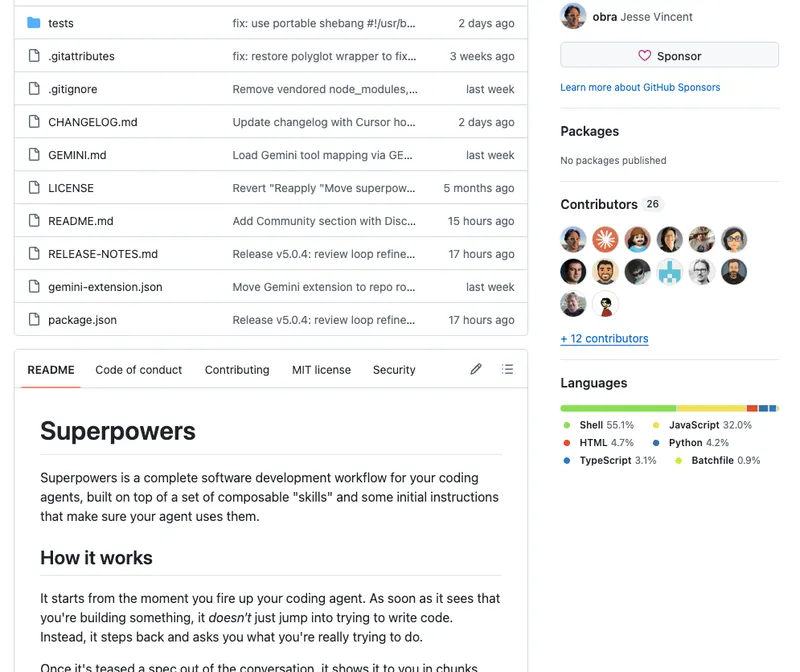
The other major mode change was that I used the Claude Code Superpowers Plugin from Jesse Vincent, which I had heard good things about but hadn’t had a chance to try. The process with Superpowers was significantly more structured and Test Driven Development (TDD) oriented:
-
Structured brainstorming with parallel research agents: Before writing any code, Claude dispatched 4 research agents simultaneously — covering package versions, Cloudflare patterns, MCP protocol spec, and Google API prior art. This tech audit informed all 13 design decisions.
-
Deliberate decision gates: Claude asked each architectural question one at a time with options and a recommendation, and wouldn’t proceed without explicit approval. This prevented bad defaults from getting locked in early.
-
Subagent-driven execution: Plan 1 (infrastructure) was broken into 9 tasks, each dispatched to a fresh subagent for implementation while the main orchestration agent coordinated. This kept the main context clean and let mechanical work run fast.
-
Live multi-surface testing: Tested simultaneously from Claude.ai, Claude Desktop, and Claude Code, which surfaced real integration bugs (OAuth colon parsing, CORS headers, table index math) that unit tests couldn’t catch. Giving Claude Code access to the MCP itself enabled extreme-speed smoke testing, probably 100X my human speed.
-
Real content as test material: Instead of lorem ipsum, we used the MCP to create actual useful documents during testing, serving double duty as QA and real output. Here’s an example Google Doc created entirely by Claude using the connector.
This is Freaking Insane
A novel, state-of-the-art Claude Connector (remote OAuth MCP), with an advanced feature set that beats everything Anthropic offers and Google doesn’t offer, completed over the weekend, with minimal human screen time. This is crazy.
The Awakening continues.